Just How Many USB Devices Can I Attach to My Computer?
Short Answer - It depends!
Well each one of us at some point have looked at an USB hub and thought, if I keep daisy-chaining these USB-hubs together - Just How Many USB Devices Can I Attach to My Computer?
To answer that, let’s dive into USB specification a bit -
The USB specification defines two different connectivity types in the USB tree topology: number of layers or tiers and number of endpoints or functions. Please note that endpoints are not the same thing as devices.
Defining USB Tiers
USB tiers come from the use of USB hubs, where each USB hub is, in fact, its own USB device as well as the start of a new layer of USB devices. The USB 2.0 specification includes the following diagram to illustrate the USB topology -
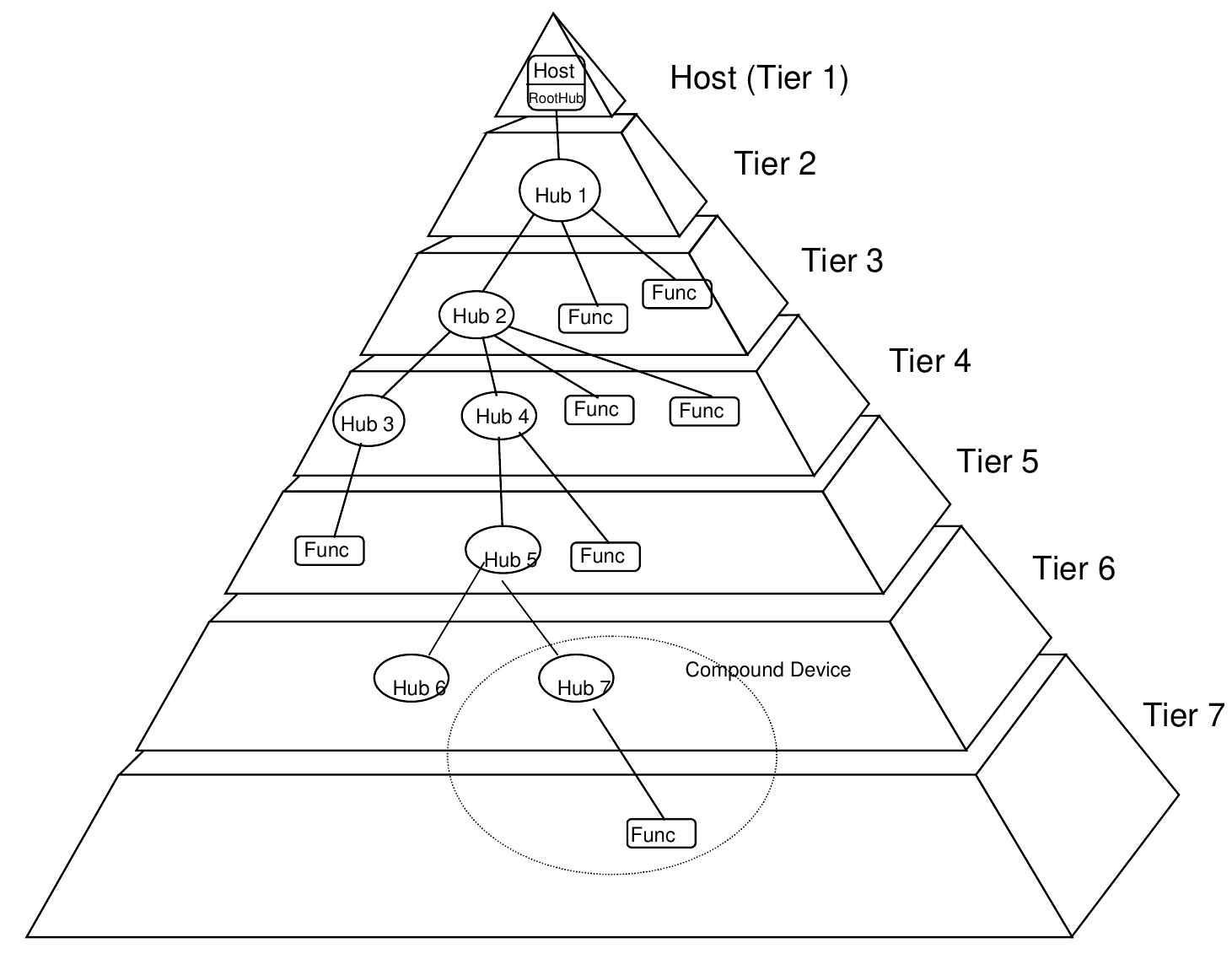
The host and root hub are on the first tier, and connecting to a hub adds another tier. Any USB device’s tier number is equal to the connection chain’s total non-root hubs multiplied by two. The USB specification has a maximum of seven tiers. As a result, the number of daisy-chained hubs (excluding the root hub) is strictly limited to five. Moreover most host systems have just one USB controller that is integrated in the host system chipset itself.
Here is a typical PC architecture. The USB section is expanded, showing the USB Type A connectors -
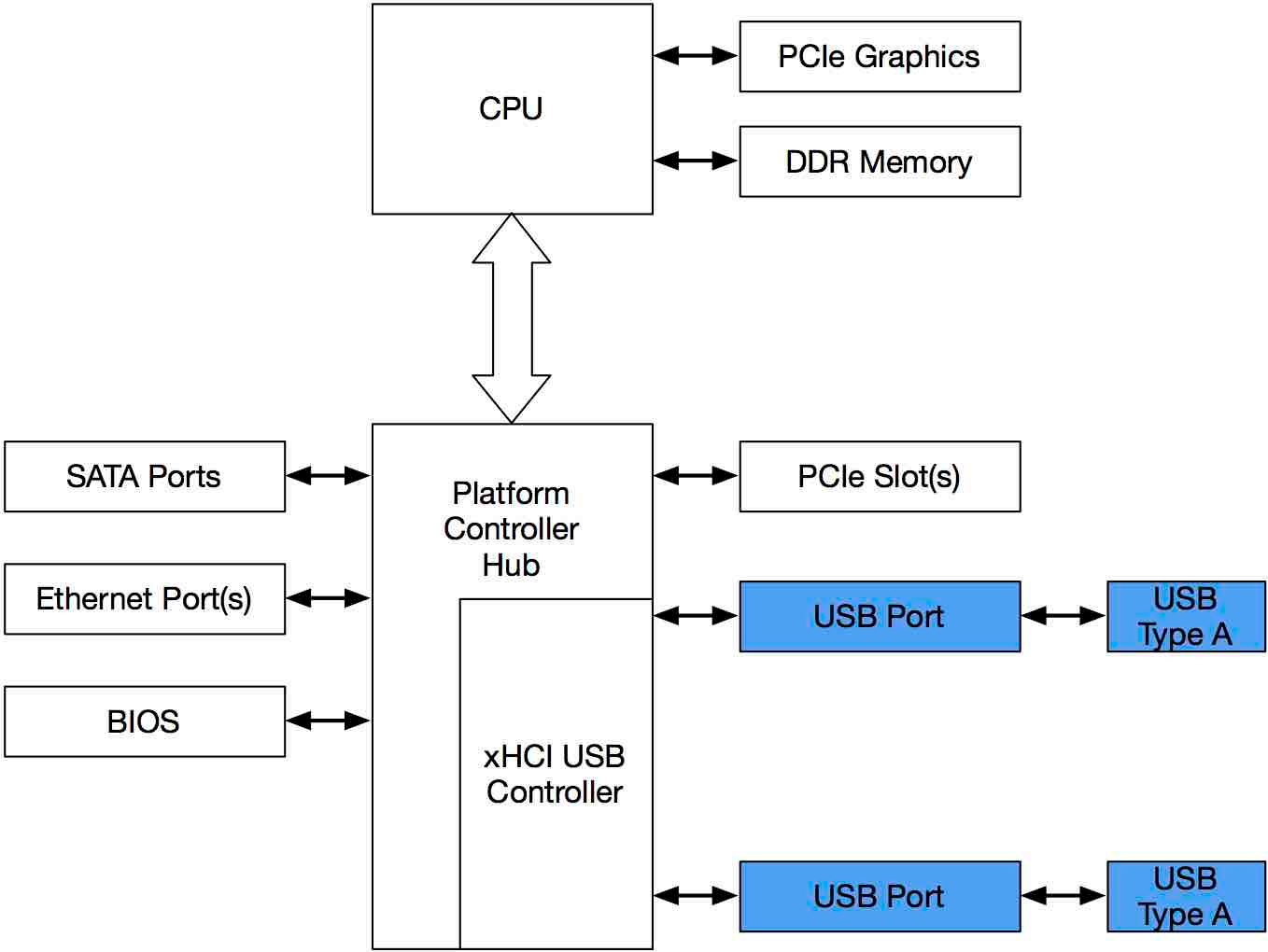
What is not commonly known is that many host machines use hub chips internally to expand the number of available USB connectors i.e. the USB ports on a host machine are not Tier 1 but Tier 2 at least. So, it is highly possible that the USB connector on our host machines are already one or even two tiers deep in the overall USB tree. So keeping that in mind the above diagram would look more like this instead -
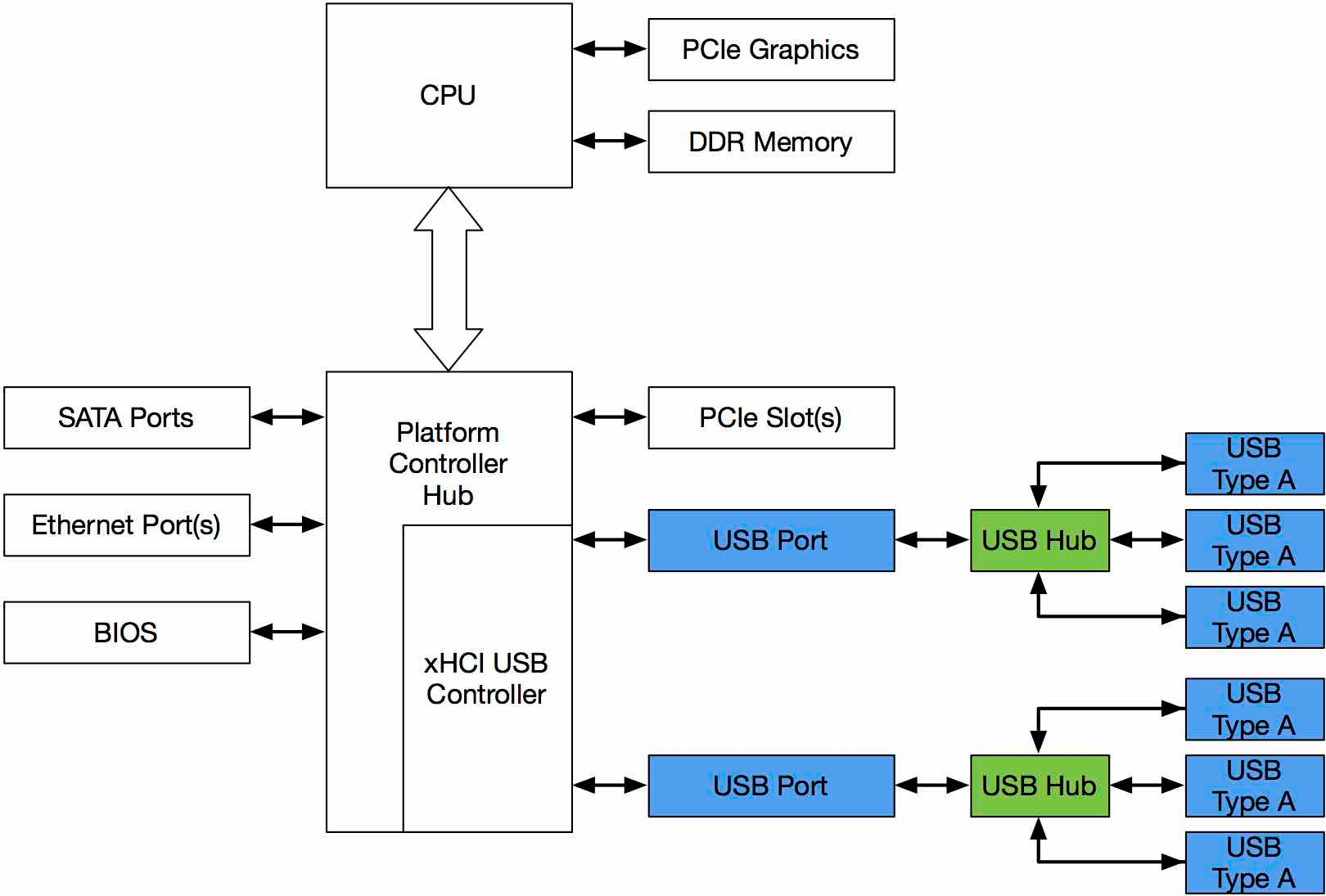
Thus, the ability to daisy-chain external hubs to keep increasing the number of devices we can connect to our provider hosts is reduced because there are already internal hubs.
Defining USB Endpoints or Functions
Each USB device can define up to 32 endpoints (16 inputs and 16 outputs), but most devices only define 2 or 3 endpoints. Hubs themselves also define at least a control endpoint. Every USB controller implementation may have its own layer or endpoint limitations and most modern USB 3.0 hosts use XHCI USB controllers.
The XHCI specification allows for a massive 7,906 endpoints, however common implementations of the XHCI controllers impose their own limit on the total number of endpoints to 96. The most notorious of these being Intel’s series 8 architectures. This means that the maximum number of devices (which use 3 endpoints) that can be attached to an Intel series 8 XHCI host controller is actually 32 devices (96 endpoints / 3 endpoints per device).
To make matters worse, USB 3.0 buses live with USB 2.0 devices i.e they live in the similar yet separate tree architecture in parallel with USB 2.0 devices, but they share the same endpoints on XHCI controllers. USB 3.0 devices may implement endpoints on both the USB 3.0 and 2.0 buses and this further reduces the number of devices which can be attached to a single XHCI host controller.
Workarounds for these limitations
Use EHCI instead of XHCI
This assumes that the chipsets in your computer support EHCI. And the BIOS on our computer allows you a method to do this. This is possible by default in older motherboards and chipsets (before Intel’s 8th gen).
Use a USB 2.0 cable from your computer to USB Hub
To add more than 18 total devices to a XHCI system, the simplest solution is to use a USB 2.0 host cable to connect the computer to a USB Hub. Since the USB Hub is now connected only with USB 2.0, there will not be any enumeration of USB 3.0 devices, including the USB 3.0 hub chips internal to the USB Hub. This will effectively reduce the USB Hub’s footprint in the USB tree by 50%.
Add a discrete USB controller to your computer
The main limitation in a computer is the integrated Intel XHCI USB host controller, and discrete USB host controllers do not have this limitation. Adding a discrete USB host controller in a PCIe expansion slot will increase the number of devices you can connect to your computer.
So In Summary
Let’s say you have an Intel computer with 10 USB ports on it. And unlimited supply of USB hubs with 5 USB ports on it. Then this is the long answer -
| Configuration | Reason | Maximum devices |
|---|---|---|
| Your Computer | No. of physical USB ports on it. | ~10 |
| Your computer + 1 USB hub | Limited by port on the hub, will add 5 more ports but take one away from the host where the hub will be connected | 14 |
| Your computer + 2 USB hub | Limited by port on the hub, will add 5 more ports but take one away from the host where the hub will be connected | 18 |
| Your computer + more than 2USB hub | Limited by the USB 3.0 standards | 18 |
| Your computer + more than 2 USB hub | Limited by the USB 3.0 standards | 18 |
| Your computer + USB 2.0 cables + more than 2 USB hub | Limited by the XHCI USB controller on Intel chipsets | 18 |
| Your computer + PCIe USB extension cards | Limited by number of physical PCIe lanes on the motherboard, prebuilt computers don't have more than 2, and one is already occupied by a GPU | <127 (Realistically somewhere around 64 as the best hubs can not support more than 32 devices) |